Graphing mail statistics trends
Client-side plugin for graphing mail statistics from mail.log
Supported loglines: postfix, ssmtp, nullmailer, postgrey, amavis, spamd.
Installation:
Client-side:
Download and copy mailgraph.sh to xymon ext directory.
Create new file /etc/xymon/clientlaunch.d/mailgraph.cfg:
Note: read permissions for mail.log file required for xymon user.
[mailgraph]
	#DISABLED
	ENVFILE $XYMONCLIENTHOME/etc/xymonclient.cfg
	CMD $XYMONCLIENTHOME/ext/mailgraph.sh
	LOGFILE $XYMONCLIENTLOGS/xymonclient.log
	INTERVAL 5m
Server-side:
Add "mailgraph=ncv" to TEST2RRD variable and "mailgraph" to GRAPHS variable in xymonserver.cfg.
Add the line "NCV_mailgraph="runtime:GAUGE,*:ABSOLUTE" to xymonserver.cfg.
Create new file /etc/xymon/graphs.d/mailgraph.cfg and add a few lines to rrddefinitions.cfg:
[mailgraph]
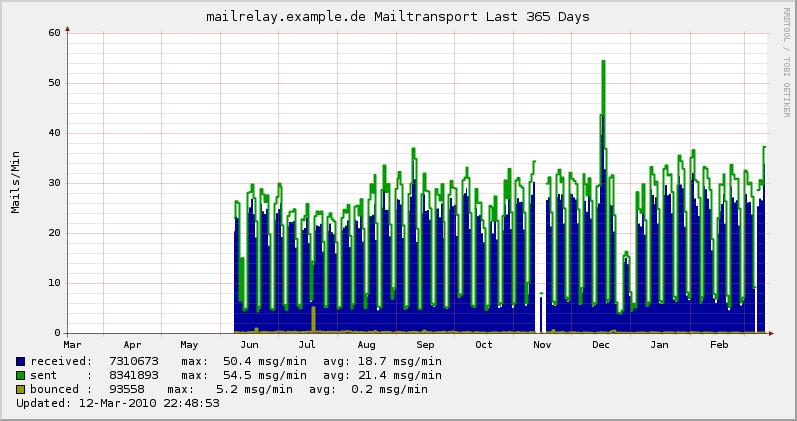
        TITLE Mailtransport
        YAXIS Mails/Min
        -l 0
        DEF:received=mailgraph.rrd:received:AVERAGE
        CDEF:rreceived=received,60,*
        VDEF:receivedtotal=received,TOTAL
        AREA:rreceived#00009C:received\:
        GPRINT:receivedtotal:%5.0lf
        GPRINT:rreceived:MAX:max\: %5.1lf msg/min
        GPRINT:rreceived:AVERAGE:avg\:%5.1lf msg/min\n

        DEF:sent=mailgraph.rrd:sent:AVERAGE
        CDEF:rsent=sent,60,*
        VDEF:senttotal=sent,TOTAL
        LINE:rsent#009C00:sent    \:
        GPRINT:senttotal:%5.0lf
        GPRINT:rsent:MAX:max\: %5.1lf msg/min
        GPRINT:rsent:AVERAGE:avg\:%5.1lf msg/min\n

        DEF:deferred=mailgraph.rrd:deferred:AVERAGE
        CDEF:rdeferred=deferred,60,*
        VDEF:deferredtotal=deferred,TOTAL
        LINE:rdeferred#888888:deferred\:
        GPRINT:deferredtotal:%5.0lf
        GPRINT:rdeferred:MAX:max\: %5.1lf msg/min
        GPRINT:rdeferred:AVERAGE:avg\:%5.1lf msg/min\n

        DEF:bounced=mailgraph.rrd:bounced:AVERAGE
        CDEF:rbounced=bounced,60,*
        VDEF:bouncedtotal=bounced,TOTAL
        LINE:rbounced#FF5500:bounced \:
        GPRINT:bouncedtotal:%5.0lf
        GPRINT:rbounced:MAX:max\: %5.1lf msg/min
        GPRINT:rbounced:AVERAGE:avg\:%5.1lf msg/min\n

[mailgraph-tls-mail]
        TITLE Mails-IN TLS/noTLS
        YAXIS Mails/Min
        -l 0
        DEF:mailnotls=mailgraph.rrd:mailnotls:AVERAGE
        CDEF:rmailnotls=mailnotls,60,*
        VDEF:mailnotlstotal=mailnotls,TOTAL
        AREA:rmailnotls#FF0000:mailin-notls\:
        GPRINT:mailnotlstotal:%5.0lf
        GPRINT:rmailnotls:MAX:max\: %5.1lf conn/min
        GPRINT:rmailnotls:AVERAGE:avg\:%5.1lf conn/min\n

        DEF:mailtls=mailgraph.rrd:mailtls:AVERAGE
        CDEF:rmailtls=mailtls,60,*
        VDEF:mailtlstotal=mailtls,TOTAL
        AREA:rmailtls#0000FC:mailin-tls  \::STACK
        GPRINT:mailtlstotal:%5.0lf
        GPRINT:rmailtls:MAX:max\: %5.1lf conn/min
        GPRINT:rmailtls:AVERAGE:avg\:%5.1lf conn/min\n

[mailgraph-tls-connects]
        TITLE TLS/noTLS
        YAXIS Mails/Min
        -l 0
        DEF:innotls=mailgraph.rrd:innotls:AVERAGE
        CDEF:rinnotls=innotls,60,*
        VDEF:innotlstotal=innotls,TOTAL
        AREA:rinnotls#FF0000:conn-notls\:
        GPRINT:innotlstotal:%5.0lf
        GPRINT:rinnotls:MAX:max\: %5.1lf conn/min
        GPRINT:rinnotls:AVERAGE:avg\:%5.1lf conn/min\n

        DEF:intls=mailgraph.rrd:intls:AVERAGE
        CDEF:rintls=intls,60,*
        VDEF:intlstotal=intls,TOTAL
        AREA:rintls#0000FC:conn-tls  \::STACK
        GPRINT:intlstotal:%5.0lf
        GPRINT:rintls:MAX:max\: %5.1lf conn/min
        GPRINT:rintls:AVERAGE:avg\:%5.1lf conn/min\n

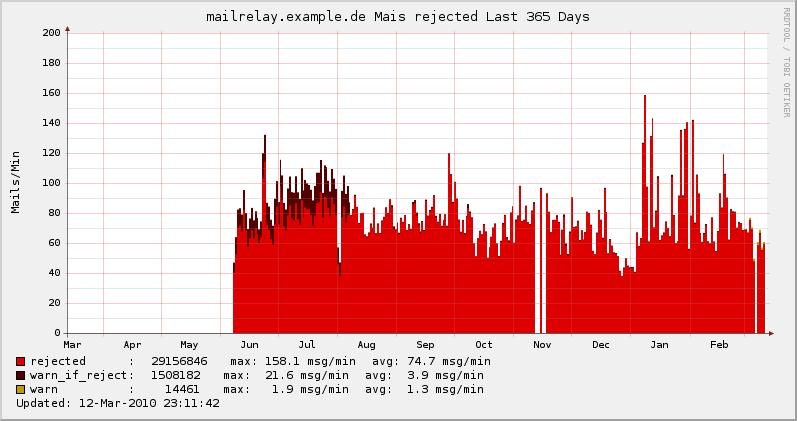
[mailgraph-rejected]
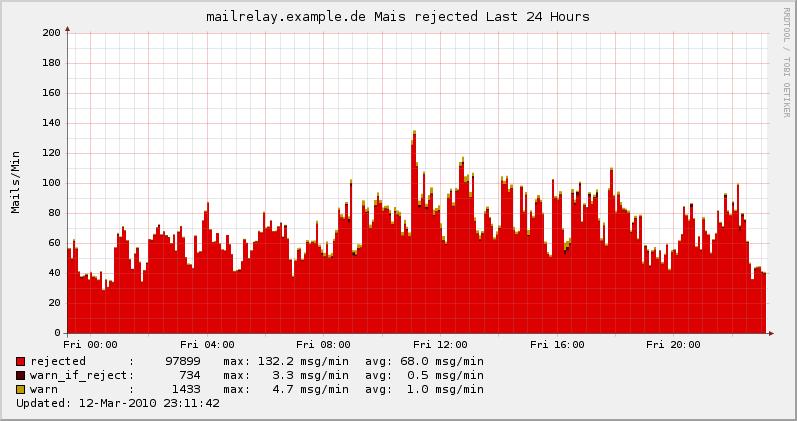
        TITLE Mais rejected
        YAXIS Mails/Min
        -l 0
        DEF:rejected=mailgraph.rrd:rejected:AVERAGE
        CDEF:rrejected=rejected,60,*
        VDEF:rejectedtotal=rejected,TOTAL
        AREA:rrejected#DD0000:rejected      \:
        GPRINT:rejectedtotal:%7.0lf
        GPRINT:rrejected:MAX:max\: %5.1lf msg/min
        GPRINT:rrejected:AVERAGE:avg\:%5.1lf msg/min\n

        DEF:rejectwarning=mailgraph.rrd:rejectwarning:AVERAGE
        CDEF:rrejectwarning=rejectwarning,60,*
        VDEF:rejectwarningtotal=rejectwarning,TOTAL
        AREA:rrejectwarning#550000:warn_if_reject\::STACK
        GPRINT:rejectwarningtotal:%7.0lf
        GPRINT:rrejectwarning:MAX:max\: %5.1lf msg/min
        GPRINT:rrejectwarning:AVERAGE:avg\:%5.1lf msg/min\n

        DEF:warning=mailgraph.rrd:warning:AVERAGE
        CDEF:rwarning=warning,60,*
        VDEF:warningtotal=warning,TOTAL
        AREA:rwarning#C29B00:warn          \::STACK
        GPRINT:warningtotal:%7.0lf
        GPRINT:rwarning:MAX: max\: %5.1lf msg/min
        GPRINT:rwarning:AVERAGE:avg\:%5.1lf msg/min\n

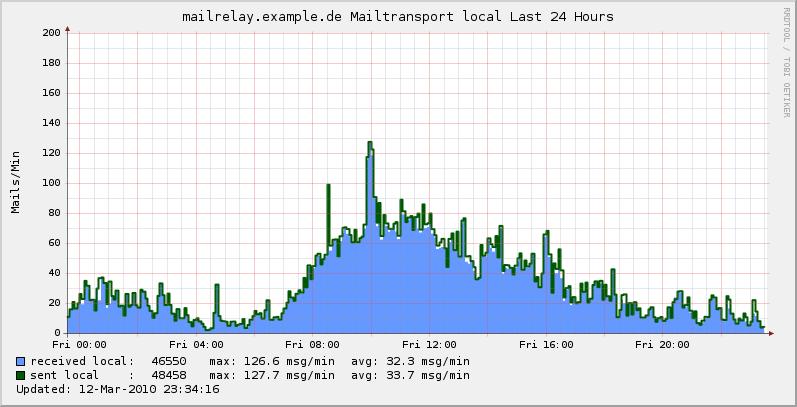
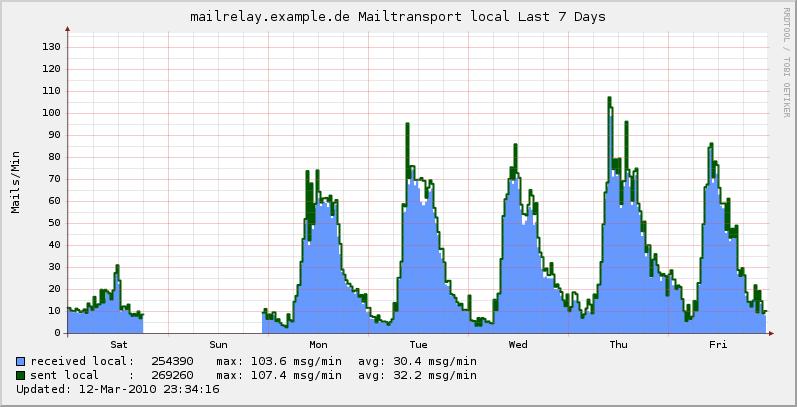
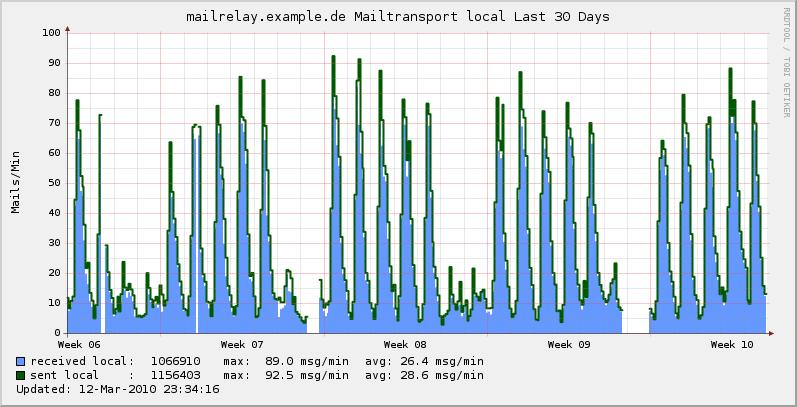
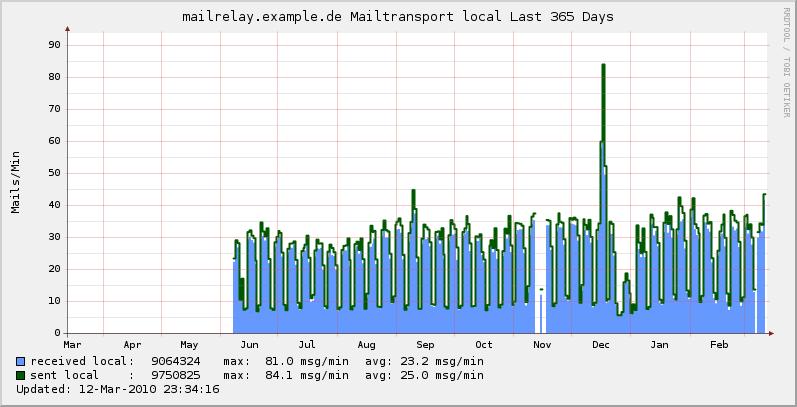
[mailgraph-local]
        TITLE Mailtransport local
        YAXIS Mails/Min
        -l 0
        DEF:receivedlocal=mailgraph.rrd:receivedlocal:AVERAGE
        CDEF:rreceivedlocal=receivedlocal,60,*
        VDEF:receivedlocaltotal=receivedlocal,TOTAL
        AREA:rreceivedlocal#6699FF:received local\:
        GPRINT:receivedlocaltotal:%5.0lf
        GPRINT:rreceivedlocal:MAX:max\: %5.1lf msg/min
        GPRINT:rreceivedlocal:AVERAGE:avg\:%5.1lf msg/min\n

        DEF:sentlocal=mailgraph.rrd:sentlocal:AVERAGE
        CDEF:rsentlocal=sentlocal,60,*
        VDEF:sentlocaltotal=sentlocal,TOTAL
        LINE2:rsentlocal#005800:sent local    \:
        GPRINT:sentlocaltotal:%5.0lf
        GPRINT:rsentlocal:MAX:max\: %5.1lf msg/min
        GPRINT:rsentlocal:AVERAGE:avg\:%5.1lf msg/min\n

[mailgraph-proto-received]
        TITLE Mails received ipv4/ipv6
        YAXIS Mails/Min
        -l 0
        DEF:received6=mailgraph.rrd:received6:AVERAGE
        CDEF:rreceived6=received6,60,*
        VDEF:received6total=received6,TOTAL
        AREA:rreceived6#FF0000:rec-6\:
        GPRINT:received6total:%5.0lf
        GPRINT:rreceived6:MAX:max\: %5.1lf msg/min
        GPRINT:rreceived6:AVERAGE:avg\:%5.1lf msg/min\n

        DEF:received4=mailgraph.rrd:received4:AVERAGE
        CDEF:rreceived4=received4,60,*
        VDEF:received4total=received4,TOTAL
        AREA:rreceived4#0000FC:rec-4\::STACK
        GPRINT:received4total:%5.0lf
        GPRINT:rreceived4:MAX:max\: %5.1lf msg/min
        GPRINT:rreceived4:AVERAGE:avg\:%5.1lf msg/min\n

[mailgraph-proto-sent]
        TITLE Mails sent ipv4/ipv6
        YAXIS Mails/Min
        -l 0
        DEF:sent6=mailgraph.rrd:sent6:AVERAGE
        CDEF:rsent6=sent6,60,*
        VDEF:sent6total=sent6,TOTAL
        AREA:rsent6#FF0000:sent-6\:
        GPRINT:sent6total:%5.0lf
        GPRINT:rsent6:MAX:max\: %5.1lf msg/min
        GPRINT:rsent6:AVERAGE:avg\:%5.1lf msg/min\n

        DEF:sent4=mailgraph.rrd:sent4:AVERAGE
        CDEF:rsent4=sent4,60,*
        VDEF:sent4total=sent4,TOTAL
        AREA:rsent4#0000FC:sent-4\::STACK
        GPRINT:sent4total:%5.0lf
        GPRINT:rsent4:MAX:max\: %5.1lf msg/min
        GPRINT:rsent4:AVERAGE:avg\:%5.1lf msg/min\n

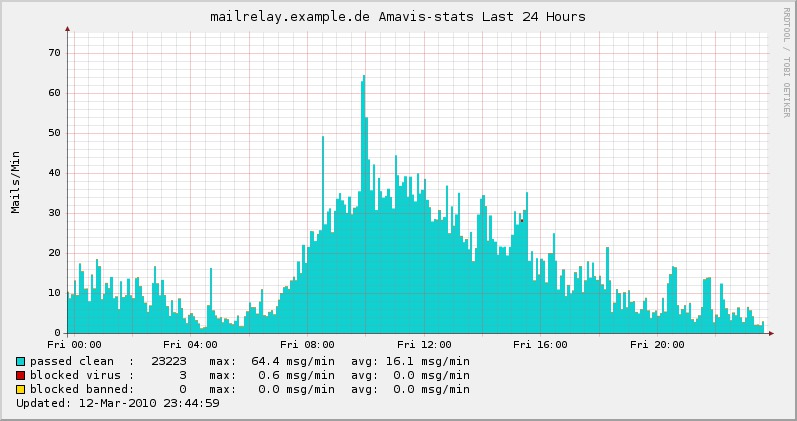
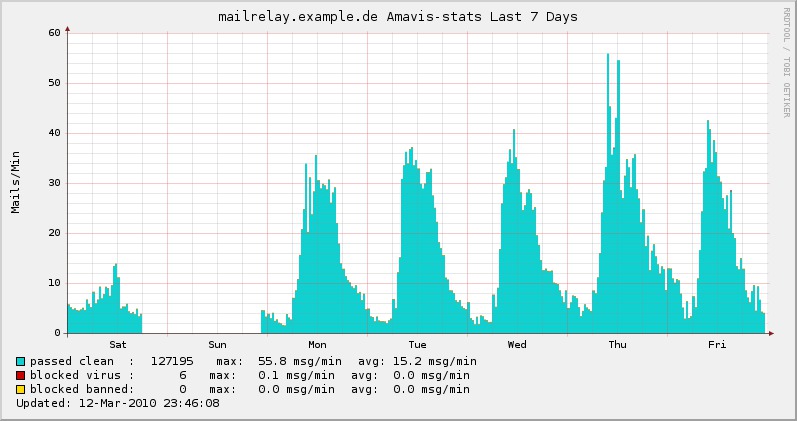
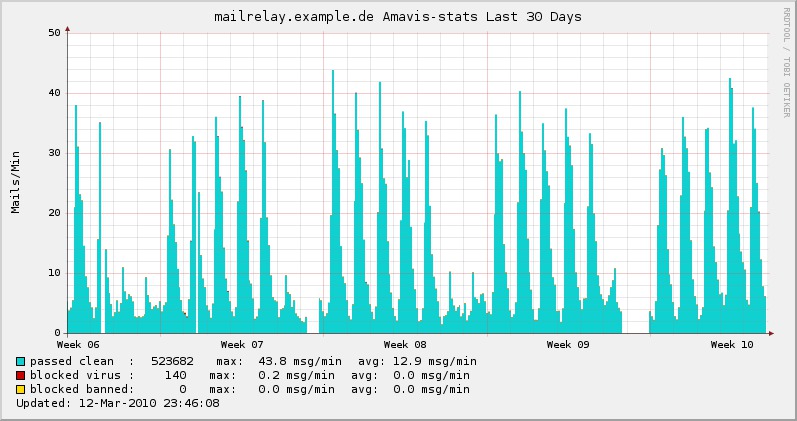
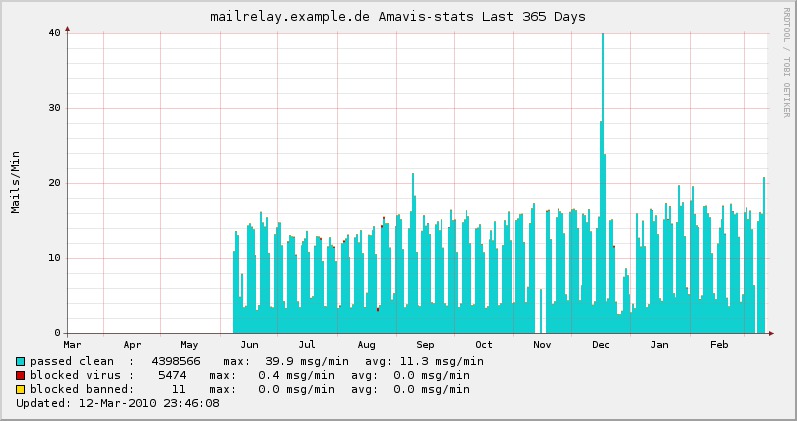
[mailgraph-amavis]
        TITLE Amavis-stats
        YAXIS Mails/Min
        -l 0
        DEF:passedclean=mailgraph.rrd:passedclean:AVERAGE
        CDEF:rpassedclean=passedclean,60,*
        VDEF:passedcleantotal=passedclean,TOTAL
        AREA:rpassedclean#10D0D0:passed clean  \:
        GPRINT:passedcleantotal:%5.0lf
        GPRINT:rpassedclean:MAX:max\: %5.1lf msg/min
        GPRINT:rpassedclean:AVERAGE:avg\:%5.1lf msg/min\n

        DEF:blockedvirus=mailgraph.rrd:blockedvirus:AVERAGE
        CDEF:rblockedvirus=blockedvirus,60,*
        VDEF:blockedvirustotal=blockedvirus,TOTAL
        AREA:rblockedvirus#CC0000:blocked virus \::STACK
        GPRINT:blockedvirustotal:%5.0lf
        GPRINT:rblockedvirus:MAX:max\: %5.1lf msg/min
        GPRINT:rblockedvirus:AVERAGE:avg\:%5.1lf msg/min\n

        DEF:blockedbanned=mailgraph.rrd:blockedbanned:AVERAGE
        CDEF:rblockedbanned=blockedbanned,60,*
        VDEF:blockedbannedtotal=blockedbanned,TOTAL
        AREA:rblockedbanned#FFDD00:blocked banned\::STACK
        GPRINT:blockedbannedtotal:%5.0lf
        GPRINT:rblockedbanned:MAX:max\: %5.1lf msg/min
        GPRINT:rblockedbanned:AVERAGE:avg\:%5.1lf msg/min\n

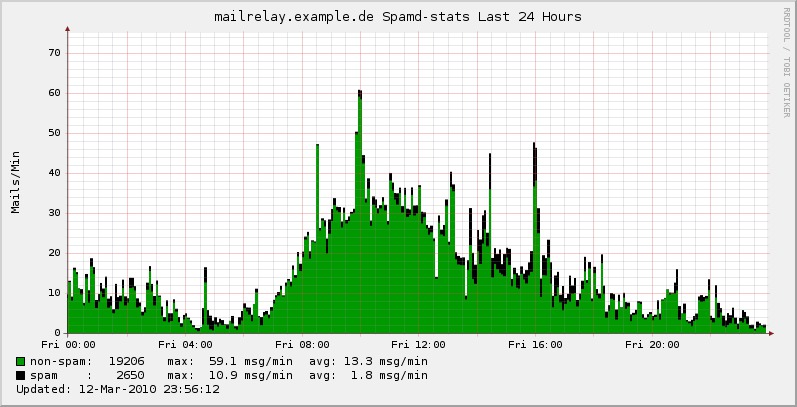
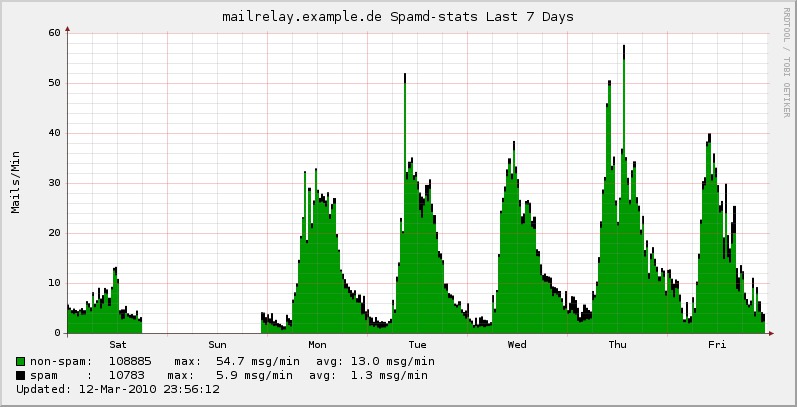
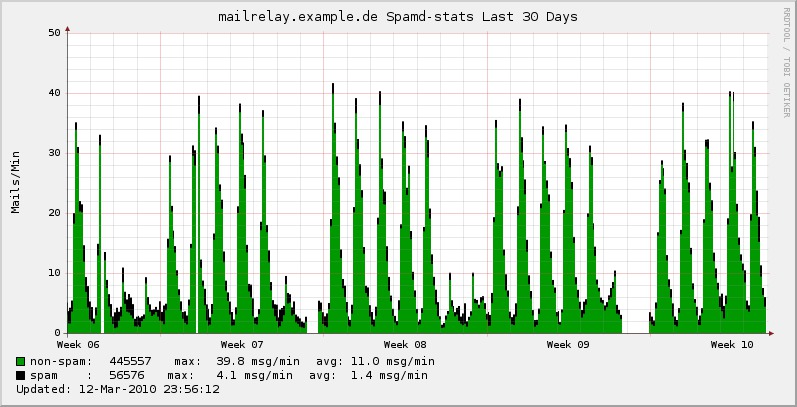
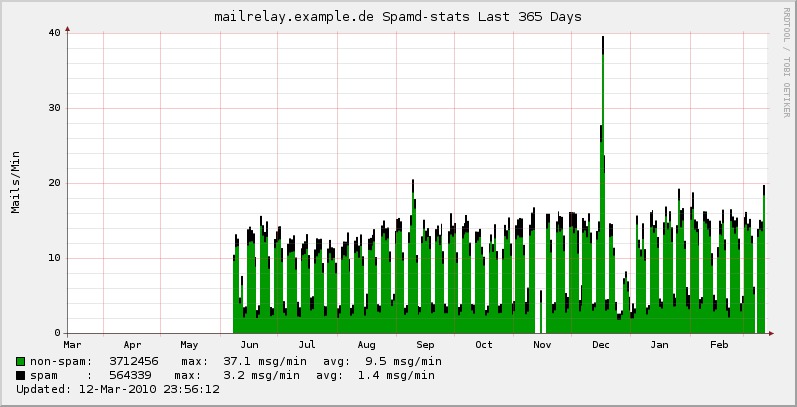
[mailgraph-spamd]
        TITLE Spamd-stats
        YAXIS Mails/Min
        -l 0

        DEF:spam=mailgraph.rrd:spam:AVERAGE
        CDEF:rspam=spam,60,*
        VDEF:spamtotal=spam,TOTAL
        AREA:rspam#000000:spam    \:
        GPRINT:spamtotal:%5.0lf
        GPRINT:rspam:MAX:max\: %5.1lf msg/min
        GPRINT:rspam:AVERAGE:avg\:%5.1lf msg/min\n

        DEF:nonspam=mailgraph.rrd:nonspam:AVERAGE
        CDEF:rnonspam=nonspam,60,*
        VDEF:nonspamtotal=nonspam,TOTAL
        AREA:rnonspam#009900:non-spam\::STACK
        GPRINT:nonspamtotal:%5.0lf
        GPRINT:rnonspam:MAX:max\: %5.1lf msg/min
        GPRINT:rnonspam:AVERAGE:avg\:%5.1lf msg/min\n

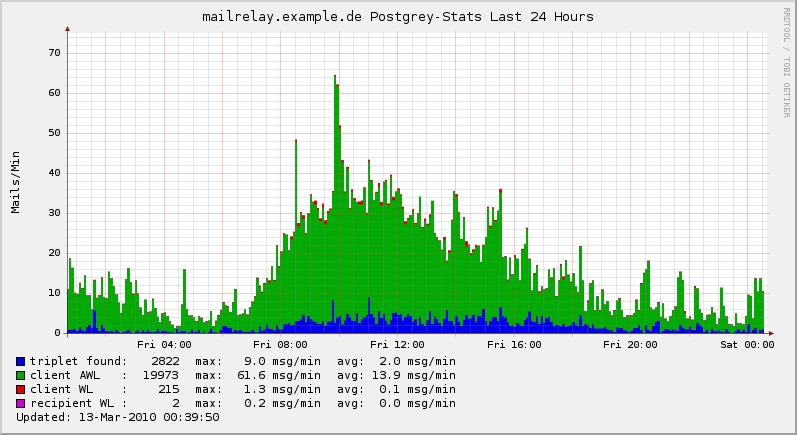
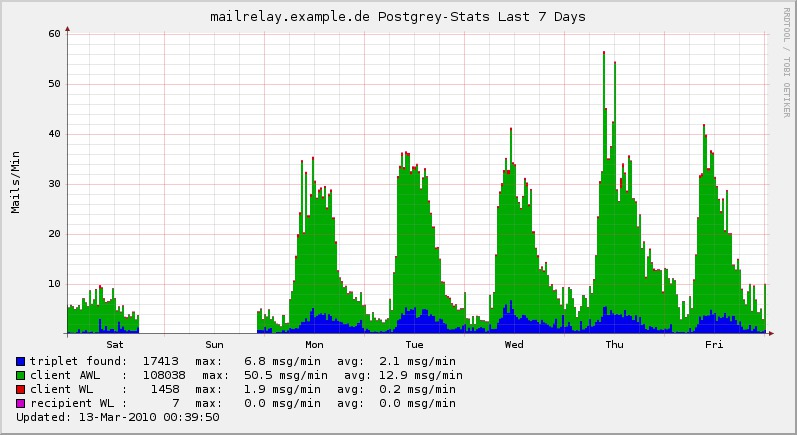
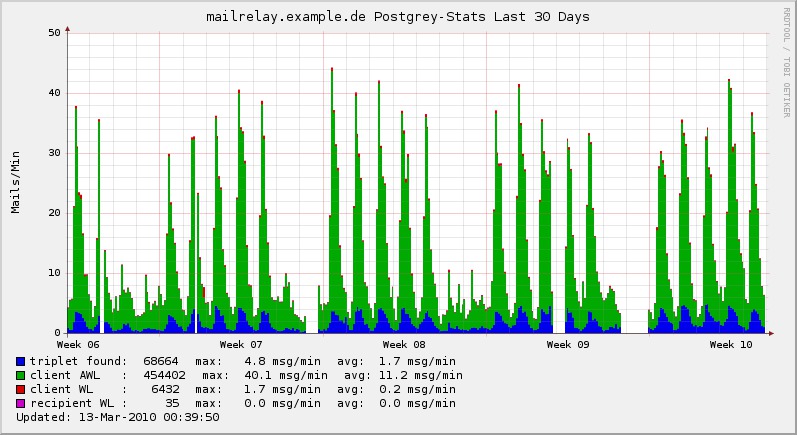
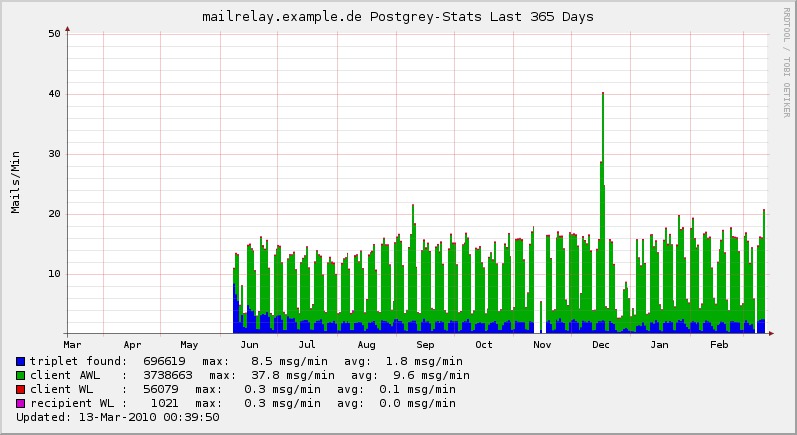
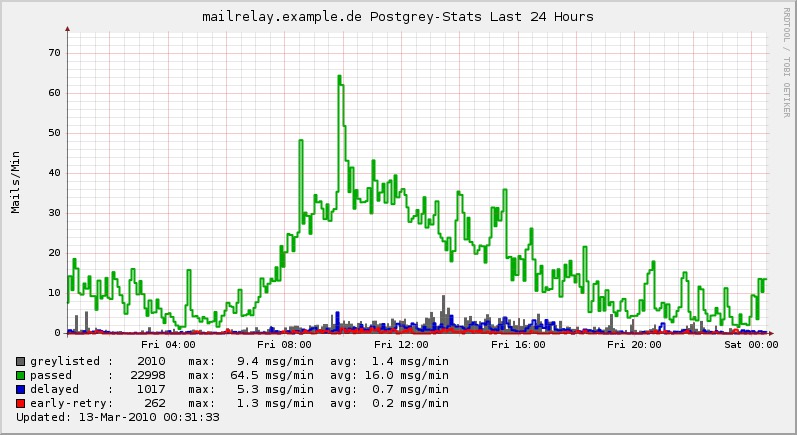
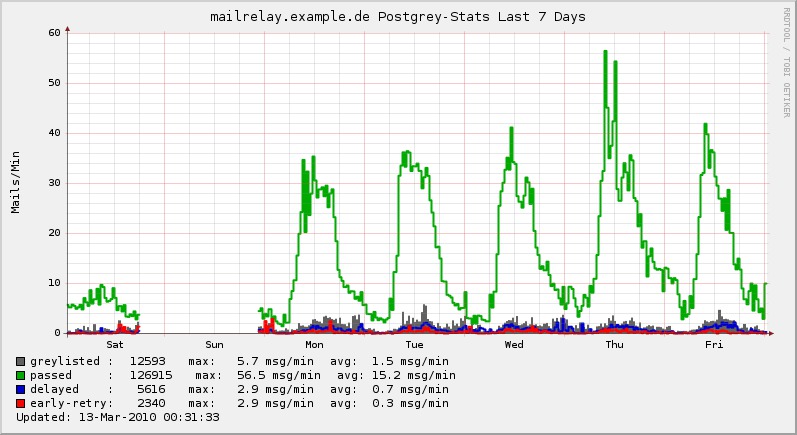
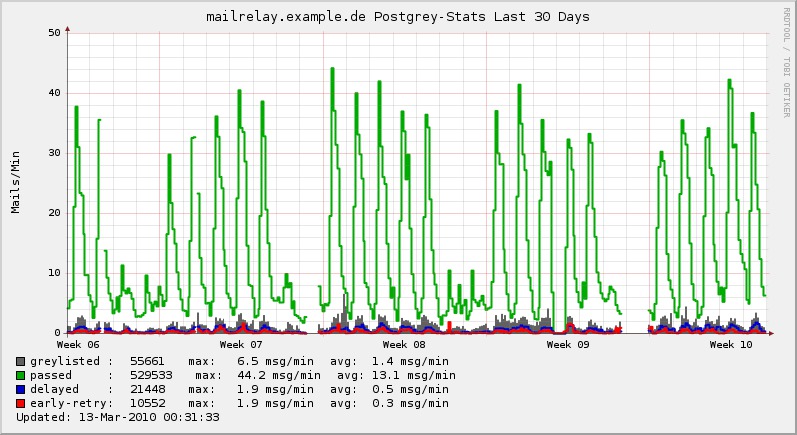
[mailgraph-postgrey]
        TITLE Postgrey-Stats
        YAXIS Mails/Min

        DEF:greylisted=mailgraph.rrd:greylisted:AVERAGE
        CDEF:rgreylisted=greylisted,60,*
        VDEF:greylistedtotal=greylisted,TOTAL
        AREA:rgreylisted#616161:greylisted \:
        GPRINT:greylistedtotal:%5.0lf
        GPRINT:rgreylisted:MAX:max\: %5.1lf msg/min
        GPRINT:rgreylisted:AVERAGE:avg\:%5.1lf msg/min\n

        DEF:passed=mailgraph.rrd:passed:AVERAGE
        CDEF:rpassed=passed,60,*
        VDEF:passedtotal=passed,TOTAL
        LINE2:rpassed#00AA00:passed     \:
        GPRINT:passedtotal:%5.0lf
        GPRINT:rpassed:MAX:max\: %5.1lf msg/min
        GPRINT:rpassed:AVERAGE:avg\:%5.1lf msg/min\n

        DEF:delayed=mailgraph.rrd:delayed:AVERAGE
        CDEF:rdelayed=delayed,60,*
        VDEF:delayedtotal=delayed,TOTAL
        LINE2:rdelayed#0000CC:delayed    \:
        GPRINT:delayedtotal:%5.0lf
        GPRINT:rdelayed:MAX:max\: %5.1lf msg/min
        GPRINT:rdelayed:AVERAGE:avg\:%5.1lf msg/min\n


        DEF:earlyretry=mailgraph.rrd:earlyretry:AVERAGE
        CDEF:rearlyretry=earlyretry,60,*
        VDEF:earlyretrytotal=earlyretry,TOTAL
        LINE2:rearlyretry#FF0000:early-retry\:
        GPRINT:earlyretrytotal:%5.0lf
        GPRINT:rearlyretry:MAX:max\: %5.1lf msg/min
        GPRINT:rearlyretry:AVERAGE:avg\:%5.1lf msg/min\n

[mailgraph-postgrey-passed]
        TITLE Postgrey-Stats
        YAXIS Mails/Min

        DEF:reasontripletfound=mailgraph.rrd:reasontripletfound:AVERAGE
        CDEF:rreasontripletfound=reasontripletfound,60,*
        VDEF:reasontripletfoundtotal=reasontripletfound,TOTAL
        AREA:rreasontripletfound#0000EE:triplet found\:
        GPRINT:reasontripletfoundtotal:%5.0lf
        GPRINT:rreasontripletfound:MAX:max\: %5.1lf msg/min
        GPRINT:rreasontripletfound:AVERAGE:avg\:%5.1lf msg/min\n

        DEF:reasonawl=mailgraph.rrd:reasonawl:AVERAGE
        CDEF:rreasonawl=reasonawl,60,*
        VDEF:reasonawltotal=reasonawl,TOTAL
        AREA:rreasonawl#00AA00:client AWL   \::STACK
        GPRINT:reasonawltotal:%5.0lf
        GPRINT:rreasonawl:MAX:max\: %5.1lf msg/min
        GPRINT:rreasonawl:AVERAGE:avg\:%5.1lf msg/min\n

        DEF:reasonclientwl=mailgraph.rrd:reasonclientwl:AVERAGE
        CDEF:rreasonclientwl=reasonclientwl,60,*
        VDEF:reasonclientwltotal=reasonclientwl,TOTAL
        AREA:rreasonclientwl#DD0000:client WL    \::STACK
        GPRINT:reasonclientwltotal:%5.0lf
        GPRINT:rreasonclientwl:MAX:max\: %5.1lf msg/min
        GPRINT:rreasonclientwl:AVERAGE:avg\:%5.1lf msg/min\n

        DEF:reasonrecipwl=mailgraph.rrd:reasonrecipwl:AVERAGE
        CDEF:rreasonrecipwl=reasonrecipwl,60,*
        VDEF:reasonrecipwltotal=reasonrecipwl,TOTAL
        AREA:rreasonrecipwl#CC00CC:recipient WL \::STACK
        GPRINT:reasonrecipwltotal:%5.0lf
        GPRINT:rreasonrecipwl:MAX:max\: %5.1lf msg/min
        GPRINT:rreasonrecipwl:AVERAGE:avg\:%5.1lf msg/min\n

[mailgraph-loglines]
        TITLE Mailgraph loglines
        YAXIS Lines/Min
        -l 0
        DEF:loglines=mailgraph.rrd:loglines:AVERAGE
        CDEF:rloglines=loglines,60,*
        VDEF:loglinestotal=loglines,TOTAL
        AREA:rloglines#00CECD:processed loglines\:
        GPRINT:loglinestotal:%5.0lf
        GPRINT:rloglines:MAX:max\: %5.1lf lines/min
        GPRINT:rloglines:AVERAGE:avg\:%5.1lf lines/min\n

[mailgraph-runtime]
        TITLE Mailgraph runtime
        YAXIS Seconds
        -l 0
        DEF:runtime=mailgraph.rrd:runtime:AVERAGE
        AREA:runtime#00CECD:runtime\:
        GPRINT:runtime:LAST: \: %3.4lf (cur)
        GPRINT:runtime:MAX: \: %3.4lf (max)
        GPRINT:runtime:MIN: \: %3.4lf (min)
        GPRINT:runtime:AVERAGE: \: %3.4lf (avg)\n
[mailgraph]
    RRA:AVERAGE:0.5:1:576
    RRA:AVERAGE:0.5:6:576
    RRA:AVERAGE:0.5:24:576
    RRA:AVERAGE:0.5:288:576
    RRA:MAX:0.5:1:576
    RRA:MAX:0.5:6:576
    RRA:MAX:0.5:24:576
    RRA:MAX:0.5:288:576
Add line to xymonserver.cfg
GRAPHS_mailgraph="mailgraph,mailgraph-tls-mail,mailgraph-tls-connects,mailgraph-proto-received,mailgraph-proto-sent,mailgraph-local,mailgraph-rejected,mailgraph-amavis,mailgraph-spamd,mailgraph-postgrey,mailgraph-postgrey-passed,mailgraph-loglines,mailgraph-runtime"
Restart xymon-server.
Optional:
Define the subgraphs to include in the "trends" column in the host line or .default. line in hosts.cfg.
Example: include all defined subgraphs to trends:
TRENDS:*,mailgraph:mailgraph|mailgraph-rejected|mailgraph-local|mailgraph-amavis|mailgraph-spamd|mailgraph-postgrey|mailgraph-postgrey-passed|mailgraph-loglines|mailgraph-runtime
Download 
Screenshots:
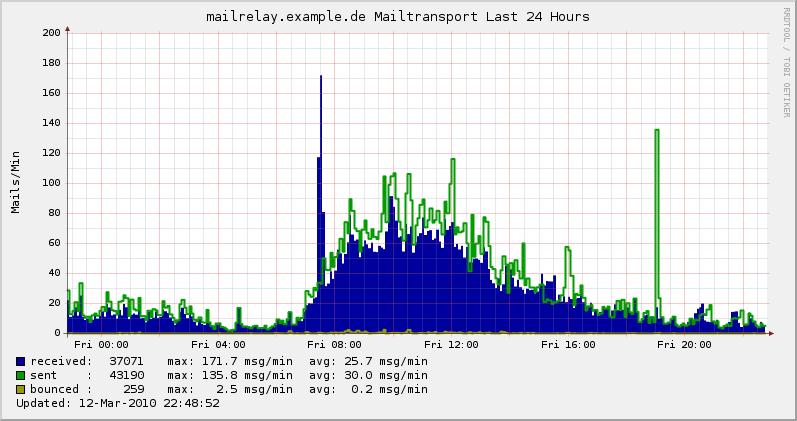
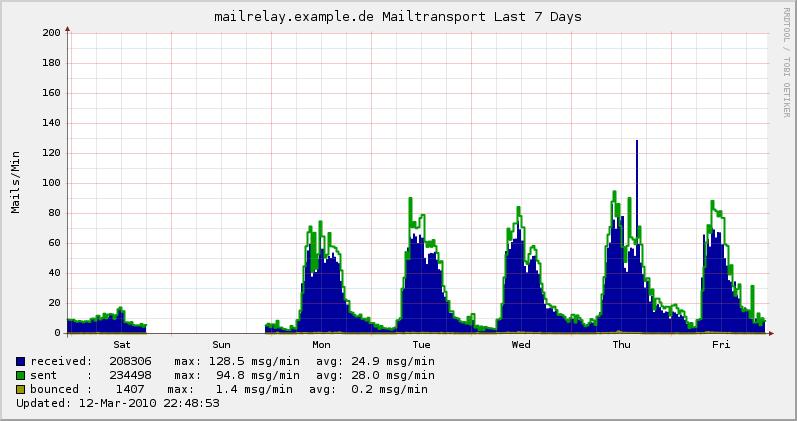
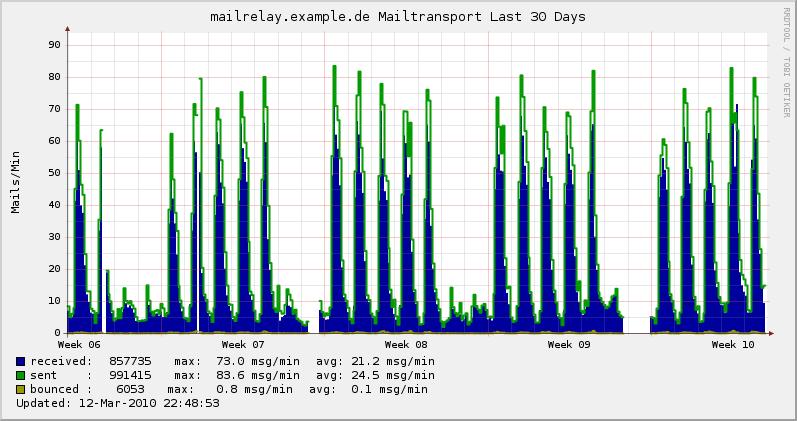
Mailtransport
Rejected mails
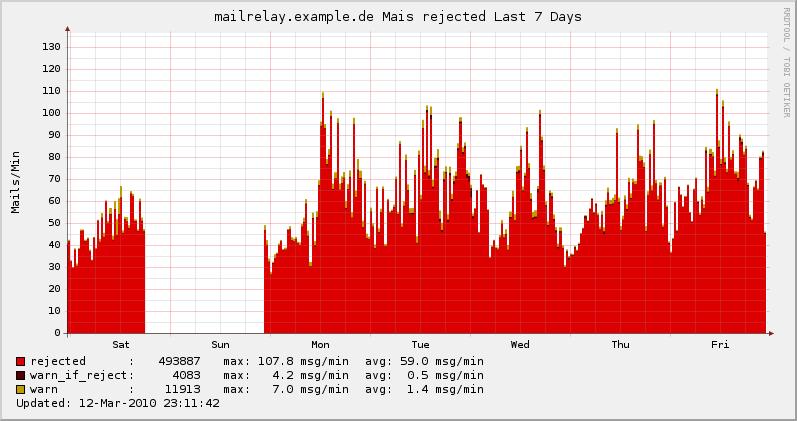
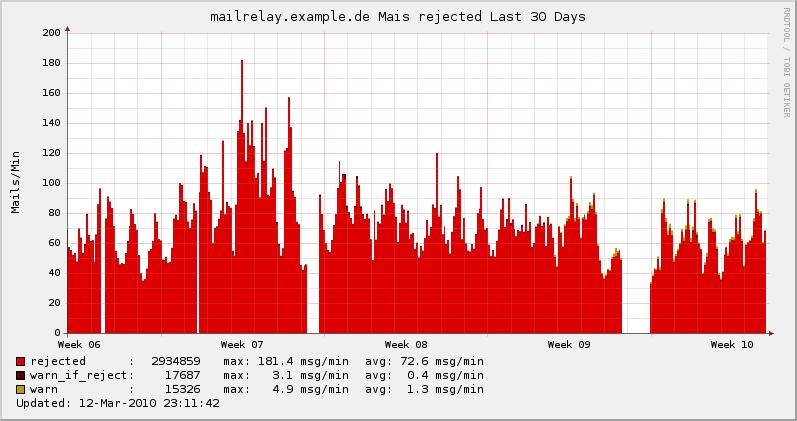
Mailtransport local
Amavis
Spamd
Postgrey
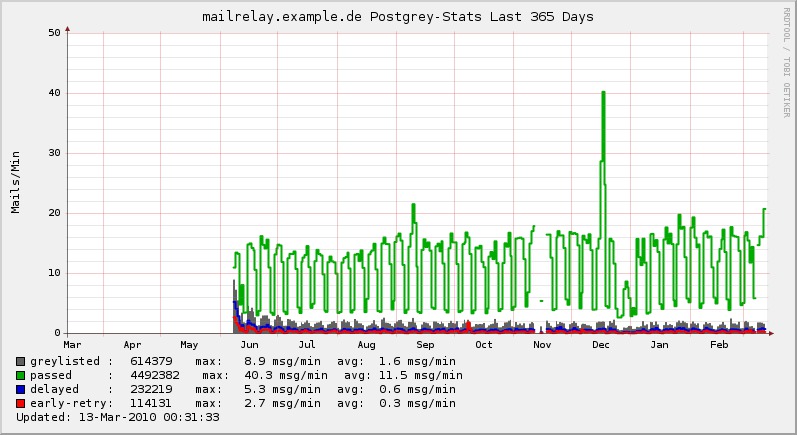
Postgrey passed