Graphing kernel ip conntrack table
Client-side plugin for monitoring and graphing the number of ip conntrack connections.
Client-side installation:
Download and copy fw-conntrack.sh to xymon ext directory.
Create new file /etc/xymon/clientlaunch.d/fw-conntrack.cfg:
[fw-conntrack]
	#DISABLED
	ENVFILE $XYMONCLIENTHOME/etc/xymonclient.cfg
	CMD $XYMONCLIENTHOME/ext/fw-conntrack.sh
	LOGFILE $XYMONCLIENTLOGS/xymonclient.log
	INTERVAL 5m
Normally xymon user can not read the files in /proc/net/ and /proc/sys/net/ipv4/netfilter/
On my machines this files are read and written for xymon to ${XYMONTMP} by root from cron job "xymon-helper"
*/5 * * * * root /usr/bin/xymoncmd /usr/lib/xymon/ext-helper/xymon-fw-conntrack-helper
#!/bin/sh

# xymon-helper script for fw-conntrack.sh

# Avoid race condition when xymon-worker run:
while [ -e ${XYMONTMP}/fw-conntrack-worker.lock ]
    do sleep 1
done

touch ${XYMONTMP}/fw-conntrack-helper.lock
trap "${RM} ${XYMONTMP}/fw-conntrack-helper.lock" 0 1 2 3 15

if [ -e /proc/sys/net/ipv4/netfilter/ip_conntrack_max ]
then
    ${CAT} /proc/sys/net/ipv4/netfilter/ip_conntrack_max > ${XYMONTMP}/ip_conntrack_max
else
    ${RM} -f ${XYMONTMP}/ip_conntrack_max
fi

if [ -e /proc/sys/net/ipv4/netfilter/ip_conntrack_count ]
then
    ${CAT} /proc/sys/net/ipv4/netfilter/ip_conntrack_count > ${XYMONTMP}/ip_conntrack_count
else
    ${RM} -f ${XYMONTMP}/ip_conntrack_count
fi

if [ -e /proc/net/ip_conntrack ]
then
    ${CAT} /proc/net/ip_conntrack > ${XYMONTMP}/ip_conntrack
else
    ${RM} -f ${XYMONTMP}/ip_conntrack
fi
Server-side installation:
Add "fw-conntrack=ncv" to TEST2RRD variable and "fw-conntrack" to GRAPHS variable in xymonserver.cfg.
Add new line "NCV_fw-conntrack="*:GAUGE" to xymonserver.cfg.
Create new file /etc/xymon/graphs.d/fw-conntrack.cfg:
[fw-conntrack]
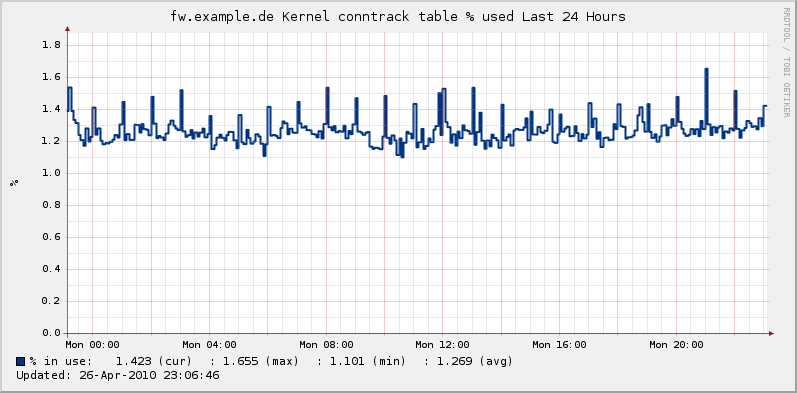
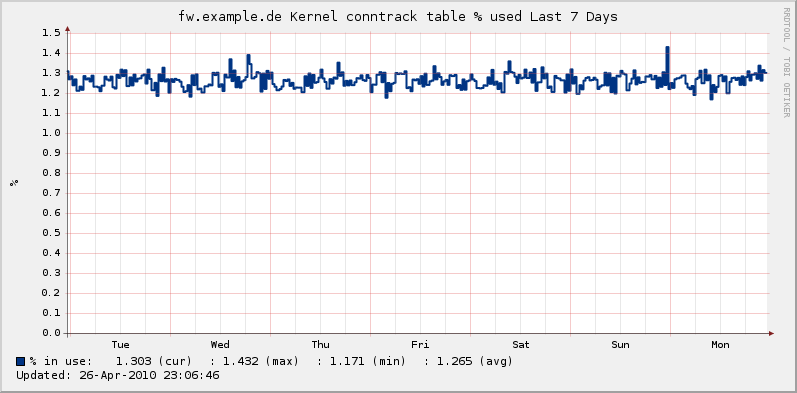
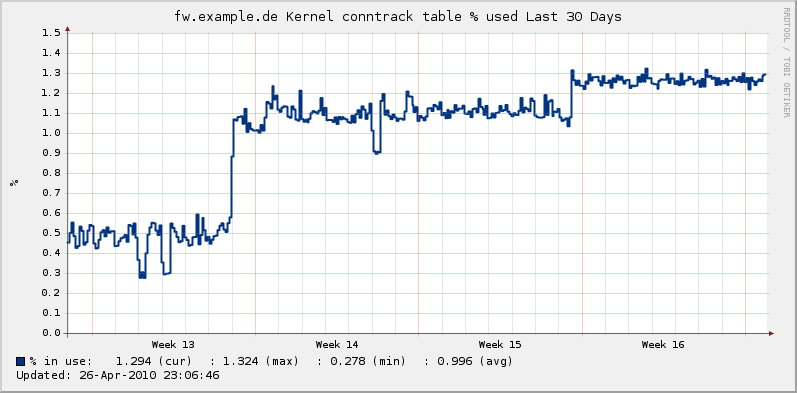
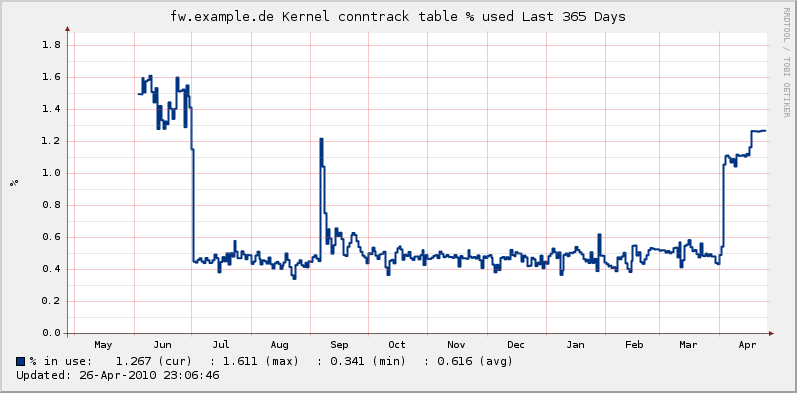
        TITLE Kernel conntrack table % used
        YAXIS %
        DEF:ctinuse=fw-conntrack.rrd:Conntrackinuse:AVERAGE
        LINE2:ctinuse#003483:% in use\:
        GPRINT:ctinuse:LAST:%6.3lf (cur)
        GPRINT:ctinuse:MAX:\:%6.3lf (max)
        GPRINT:ctinuse:MIN:\:%6.3lf (min)
        GPRINT:ctinuse:AVERAGE:\:%6.3lf (avg)\n
        -l 0
        COMMENT:\n

[fw-conntrack1]
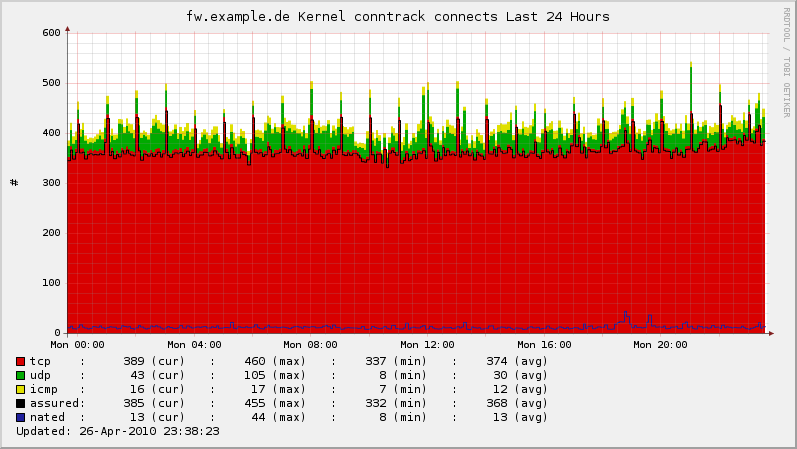
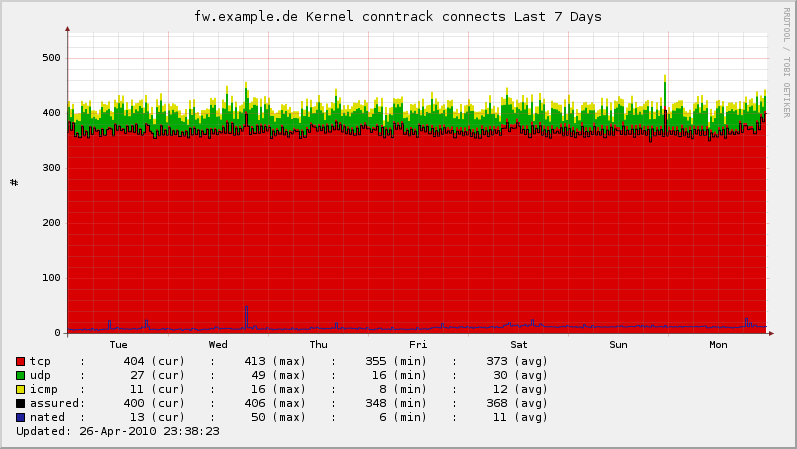
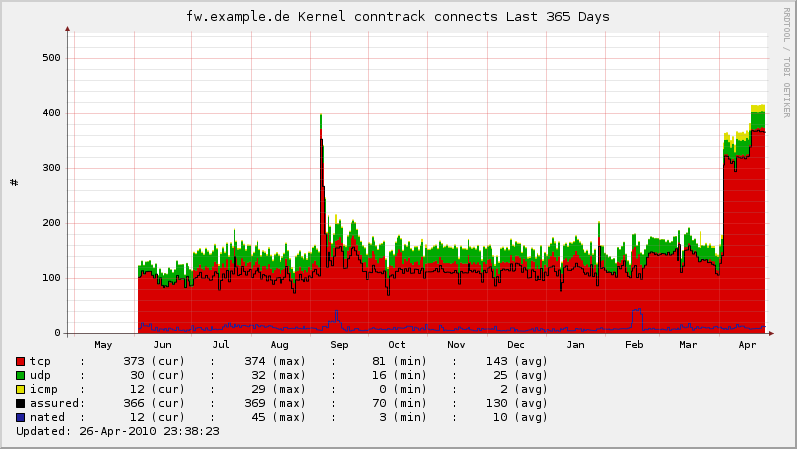
        TITLE Kernel conntrack connects
        YAXIS #
        DEF:conns=fw-conntrack.rrd:connections:AVERAGE
        DEF:tcp=fw-conntrack.rrd:tcp:AVERAGE
        DEF:udp=fw-conntrack.rrd:udp:AVERAGE
        DEF:icmp=fw-conntrack.rrd:icmp:AVERAGE
        DEF:nated=fw-conntrack.rrd:nated:AVERAGE
        DEF:assured=fw-conntrack.rrd:assured:AVERAGE

        AREA:udp#00AA00:udp    \:
        GPRINT:udp:LAST:%6.0lf (cur)
        GPRINT:udp:MAX: \: %6.0lf (max)
        GPRINT:udp:MIN: \: %6.0lf (min)
        GPRINT:udp:AVERAGE: \: %6.0lf (avg)\n

        AREA:tcp#D80000:tcp    \::STACK
        GPRINT:tcp:LAST:%6.0lf (cur)
        GPRINT:tcp:MAX: \: %6.0lf (max)
        GPRINT:tcp:MIN: \: %6.0lf (min)
        GPRINT:tcp:AVERAGE: \: %6.0lf (avg)\n

        AREA:icmp#E0E000:icmp   \::STACK
        GPRINT:icmp:LAST:%6.0lf (cur)
        GPRINT:icmp:MAX: \: %6.0lf (max)
        GPRINT:icmp:MIN: \: %6.0lf (min)
        GPRINT:icmp:AVERAGE: \: %6.0lf (avg)\n

        LINE:assured#000000:assured\:
        GPRINT:assured:LAST:%6.0lf (cur)
        GPRINT:assured:MAX: \: %6.0lf (max)
        GPRINT:assured:MIN: \: %6.0lf (min)
        GPRINT:assured:AVERAGE: \: %6.0lf (avg)\n

        LINE:nated#1F1F9B:nated  \:
        GPRINT:nated:LAST:%6.0lf (cur)
        GPRINT:nated:MAX: \: %6.0lf (max)
        GPRINT:nated:MIN: \: %6.0lf (min)
        GPRINT:nated:AVERAGE: \: %6.0lf (avg)\n
        -l 0

[fw-conntrack2]
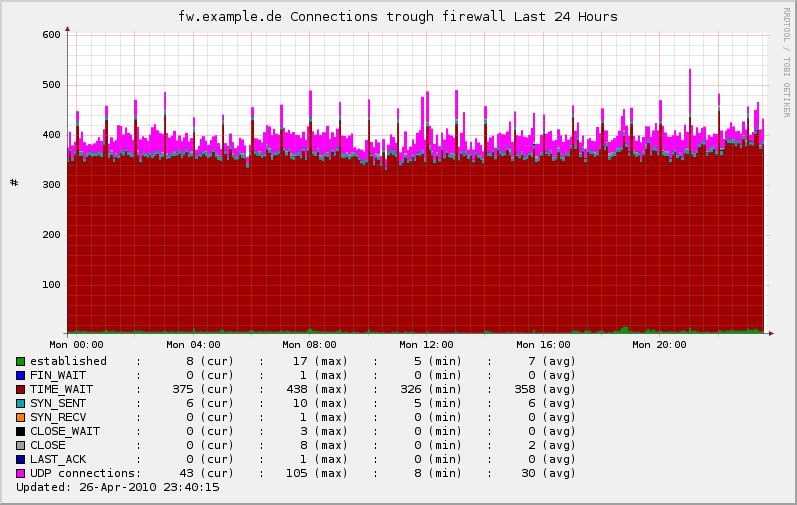
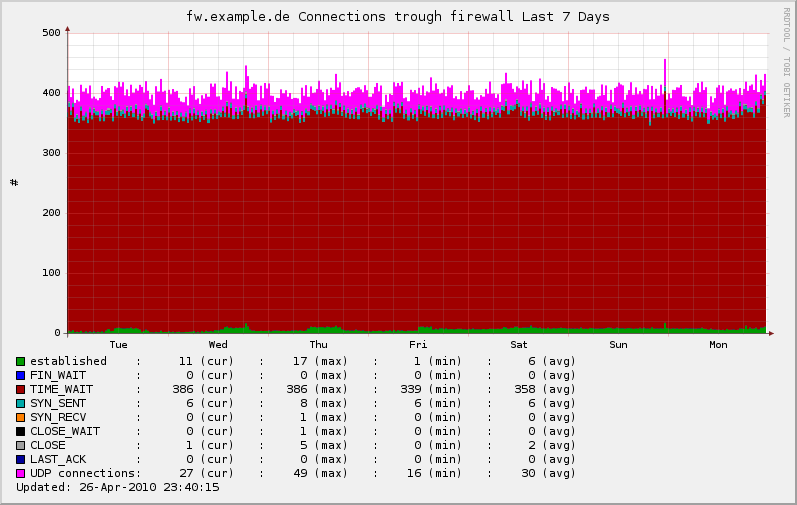
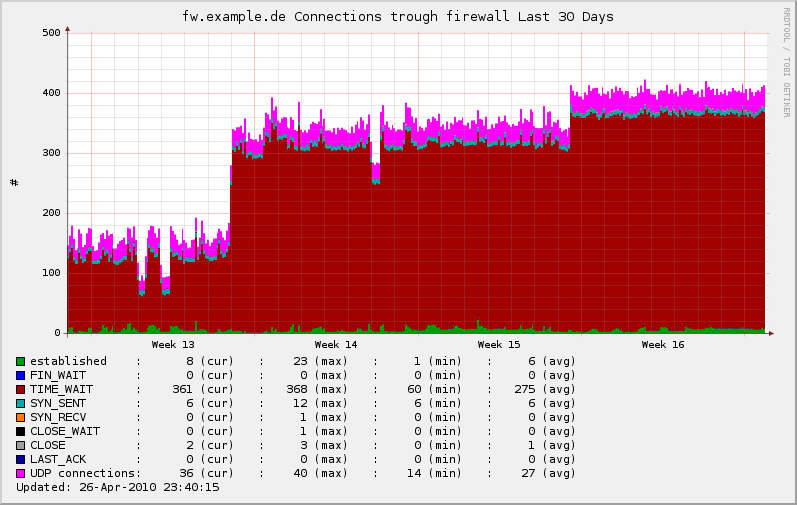
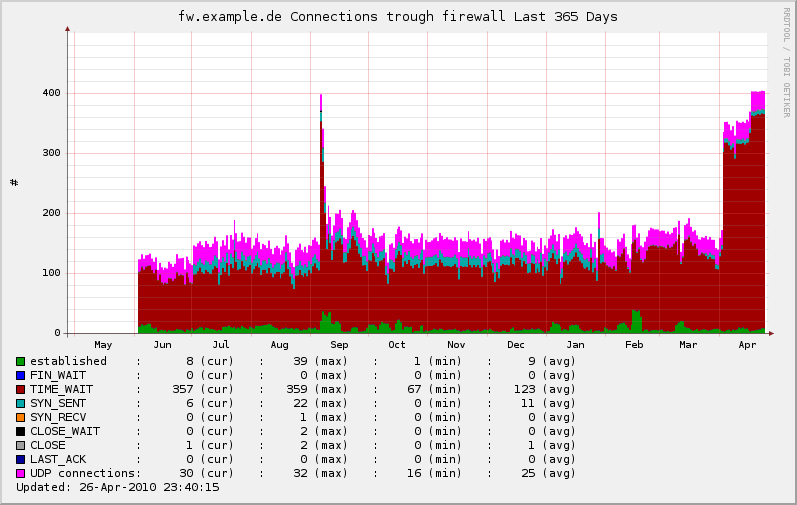
        TITLE Connections trough firewall
        YAXIS #
        DEF:established=fw-conntrack.rrd:established:AVERAGE
        DEF:timewait=fw-conntrack.rrd:timewait:AVERAGE
        DEF:finwait=fw-conntrack.rrd:finwait:AVERAGE
        DEF:closewait=fw-conntrack.rrd:closewait:AVERAGE
        DEF:close=fw-conntrack.rrd:close:AVERAGE
        DEF:synsent=fw-conntrack.rrd:synsent:AVERAGE
        DEF:synrecv=fw-conntrack.rrd:synrecv:AVERAGE
        DEF:lastack=fw-conntrack.rrd:lastack:AVERAGE
        DEF:udp=fw-conntrack.rrd:udp:AVERAGE

        AREA:established#009B00:established    \:
        GPRINT:established:LAST:%5.0lf (cur)
        GPRINT:established:MAX: \: %5.0lf (max)
        GPRINT:established:MIN: \: %5.0lf (min)
        GPRINT:established:AVERAGE: \: %5.0lf (avg)\n

        AREA:finwait#0000FF:FIN_WAIT       \::STACK
        GPRINT:finwait:LAST:%5.0lf (cur)
        GPRINT:finwait:MAX: \: %5.0lf (max)
        GPRINT:finwait:MIN: \: %5.0lf (min)
        GPRINT:finwait:AVERAGE: \: %5.0lf (avg)\n

        AREA:timewait#A00000:TIME_WAIT      \::STACK
        GPRINT:timewait:LAST:%5.0lf (cur)
        GPRINT:timewait:MAX: \: %5.0lf (max)
        GPRINT:timewait:MIN: \: %5.0lf (min)
        GPRINT:timewait:AVERAGE: \: %5.0lf (avg)\n

        AREA:synsent#00AAAA:SYN_SENT       \::STACK
        GPRINT:synsent:LAST:%5.0lf (cur)
        GPRINT:synsent:MAX: \: %5.0lf (max)
        GPRINT:synsent:MIN: \: %5.0lf (min)
        GPRINT:synsent:AVERAGE: \: %5.0lf (avg)\n

        AREA:synrecv#FF8000:SYN_RECV       \::STACK
        GPRINT:synrecv:LAST:%5.0lf (cur)
        GPRINT:synrecv:MAX: \: %5.0lf (max)
        GPRINT:synrecv:MIN: \: %5.0lf (min)
        GPRINT:synrecv:AVERAGE: \: %5.0lf (avg)\n

        AREA:closewait#000000:CLOSE_WAIT     \::STACK
        GPRINT:closewait:LAST:%5.0lf (cur)
        GPRINT:closewait:MAX: \: %5.0lf (max)
        GPRINT:closewait:MIN: \: %5.0lf (min)
        GPRINT:closewait:AVERAGE: \: %5.0lf (avg)\n

        AREA:close#9F9F9F:CLOSE          \::STACK
        GPRINT:close:LAST:%5.0lf (cur)
        GPRINT:close:MAX: \: %5.0lf (max)
        GPRINT:close:MIN: \: %5.0lf (min)
        GPRINT:close:AVERAGE: \: %5.0lf (avg)\n

        AREA:lastack#000099:LAST_ACK       \::STACK
        GPRINT:lastack:LAST:%5.0lf (cur)
        GPRINT:lastack:MAX: \: %5.0lf (max)
        GPRINT:lastack:MIN: \: %5.0lf (min)
        GPRINT:lastack:AVERAGE: \: %5.0lf (avg)\n

        AREA:udp#FF00FF:UDP connections\::STACK
        GPRINT:udp:LAST:%5.0lf (cur)
        GPRINT:udp:MAX: \: %5.0lf (max)
        GPRINT:udp:MIN: \: %5.0lf (min)
        GPRINT:udp:AVERAGE: \: %5.0lf (avg)\n

[fw-conntrack-runtime]
        TITLE FW-Conntrack own runtime
        YAXIS Seconds
        -l 0
        DEF:runtime=fw-conntrack.rrd:runtime:AVERAGE
        AREA:runtime#00CECD:runtime\:
        GPRINT:runtime:LAST: \: %3.4lf (cur)
        GPRINT:runtime:MAX: \: %3.4lf (max)
        GPRINT:runtime:MIN: \: %3.4lf (min)
        GPRINT:runtime:AVERAGE: \: %3.4lf (avg)\n
Restart xymon-server.
Define the subgraphs to include in the "trends" column in the host line or .default. line in hosts.cfg.
Example: include all defined subgraphs to trends:
TRENDS:*,fw-conntrack:fw-conntrack|fw-conntrack1|fw-conntrack2|fw-conntrack-runtime
Download

Screenshots:
% conntrack table in use
active connections
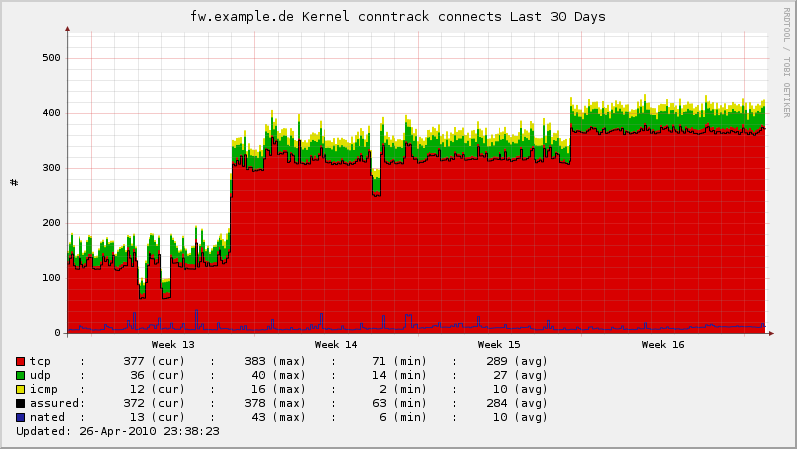
tcp connections